Understanding of Pega Gen AI Prompt Engineering Orchestration
Understanding of Pega Gen AI Prompt Engineering Orchestration
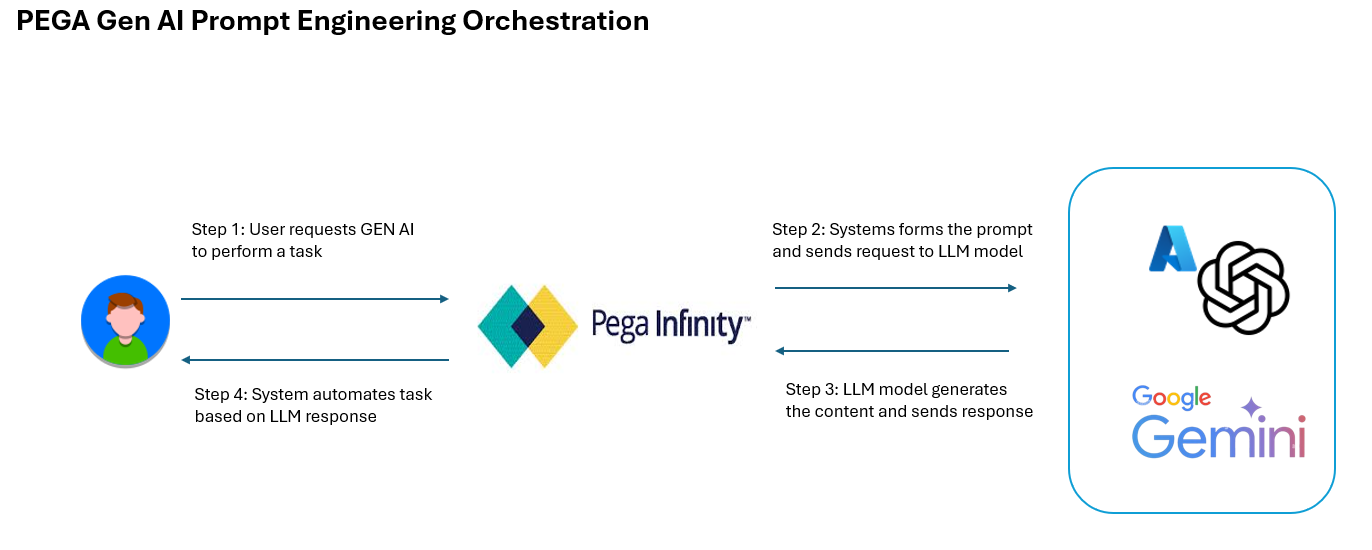
In this post, let’s explore the prompt engineering that powers Pega Infinity’s generative AI (Gen AI) features. Starting with Pega Infinity ’24, Pega offers a suite of Gen AI tools: Gen AI Blueprint, Autopilot, Coach, Knowledge Buddy, and Automate. Each feature is designed to boost automation and address specific business needs. These tools leverage large language models (LLMs), which use carefully crafted prompts to understand the business context and generate relevant content.
OpenAI’s ChatGPT, Google’s Gemini and Meta Llama are leading large language models (LLMs) providers. Organizations can access these models through pay-as-you-go services on cloud platforms: Azure, via Azure OpenAI Service, Amazon AWS Bedrock and Google Cloud, via Vertex AI. Pega platform provides integration with Azure open AI service to access the ChatGPT models, Vertex AI to access Gemini models and Amazon AWS Bedrock to access Llama and Claude models.
Pega Prompt engineering orchestration is a four-step process
Step 1: User requests Gen AI to perform a task
Step 2: The system forms the prompt and sends requests to the LLM model
Step 3: The LLM model generates the content and sends the response
Step 4: The system automates tasks based on the LLM response
In this example, let’s take a couple of scenarios
Scenario #1: User requests to fill the form with Gen AI
Assume there is a form in the Pega Application case, there is a feature that the user can fill the form using AI.
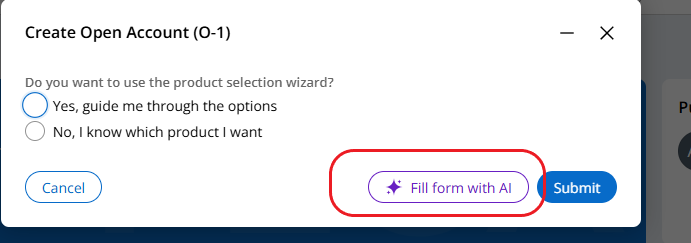
It invokes the DXAPI V2 assignment refresh service with the parameter fill the form with ai to true.
Generated prompt for LLM
### Open Account data model definition ### — GuidanceLevel with data type Text with allowed values [Yes, guide me through the options, No, I know which product I want] Suggest a JSON of 1 sample random data set with only the fields mentioned in the above data model. Do not make any assumptions and Do not add any extra fields apart from field(s) mentioned in the data model. Language code is JSON.
You can execute the above prompt in any GPT browser. Here I am using the Google Gemini
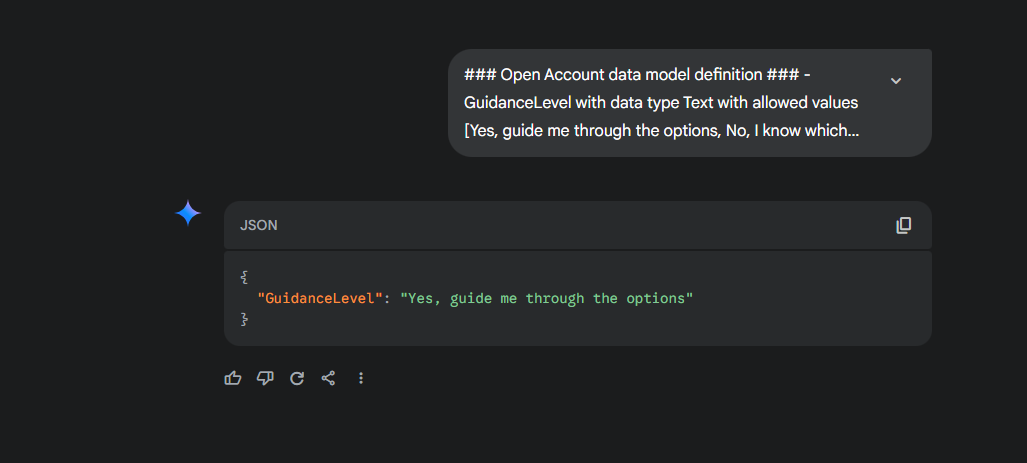
Scenario #2: User requests to generate a case type with Gen AI — Autopilot
In the App Studio, you can generate a case type using the Gen AI. In the account management application, let’s say we need to create an Update Account Information case type. Gen AI determines the stages and steps required with the below prompt.
Generated Prompt for LLM
Case Types represent workflows that drive business Outcomes at large organisations.
Case Types are broken up into major milestones called Stages.
Stages are made up of multiple steps to accomplish the milestone.
When generating the Stages and steps for the given Case Type,
insure you strictly follow the instructions below.
The structure must adhere to the following
Rules: 1) A Case Type must have a MINIMUM of three Stages
and a MAXIMUM of six Stages.
2) A Stage must have a MINIMUM of three steps
and a MAXIMUM of eight steps.
3) Stages consist of a maximum of two words
and indicate the current phase the workflow is in.
4) Steps should always reflect the work for the Stages they are in.
5) Steps make up all the work to be done in order to complete that Stage.
This work can be done by humans or Automations.
6) Step labels are a maximum of 5 words.
7) Step labels should follow the "verb" then "object" structure
like "Collect Applicant Information", "Approve Loan Amount,
or "Review document".
8) The first Stage should consist of capturing the proper information
to perform the rest of the workflow.
9) The last Stage should be the resolution of the work to a clear conclusion.
10) Strictly include only steps of type Assignment and Send email
in the first Stage.
11) Only use step types that are allowed.
12) Workflow response should be robust Step types allowed:
Assignment: a task to be routed to a single individual or set of
individuals. Assignments typically have Service Level Agreements
in order to make sure the work is completed on time.
Approval: task routed to a user or set of users that allows
them to approve or reject a certain set of data
or Decision Send email: a set in which information is sent via email
to make sure participants of the workflow are informed.
13) Avoid the word "Stage" in Stage Names.
14) Avoid special characters.
Provide the Stages and steps for a Case Type called Update Account Information in Account Management application.
Reply with only JSON in the JSON format specified below:
{"pyStages":[{"pyStageName":"Stage Name of type Text and with maximum length of 64 chars"
,"pySteps":[{"pyStepType":"Step type of type Text with enum values Assignment,
Approval,Send email","pyStepName":"Step name of type Text
Verify the rules that were given to the LLM model along with the business context.
You can execute the above prompt in any GPT browser. Here I am using the Google Gemini
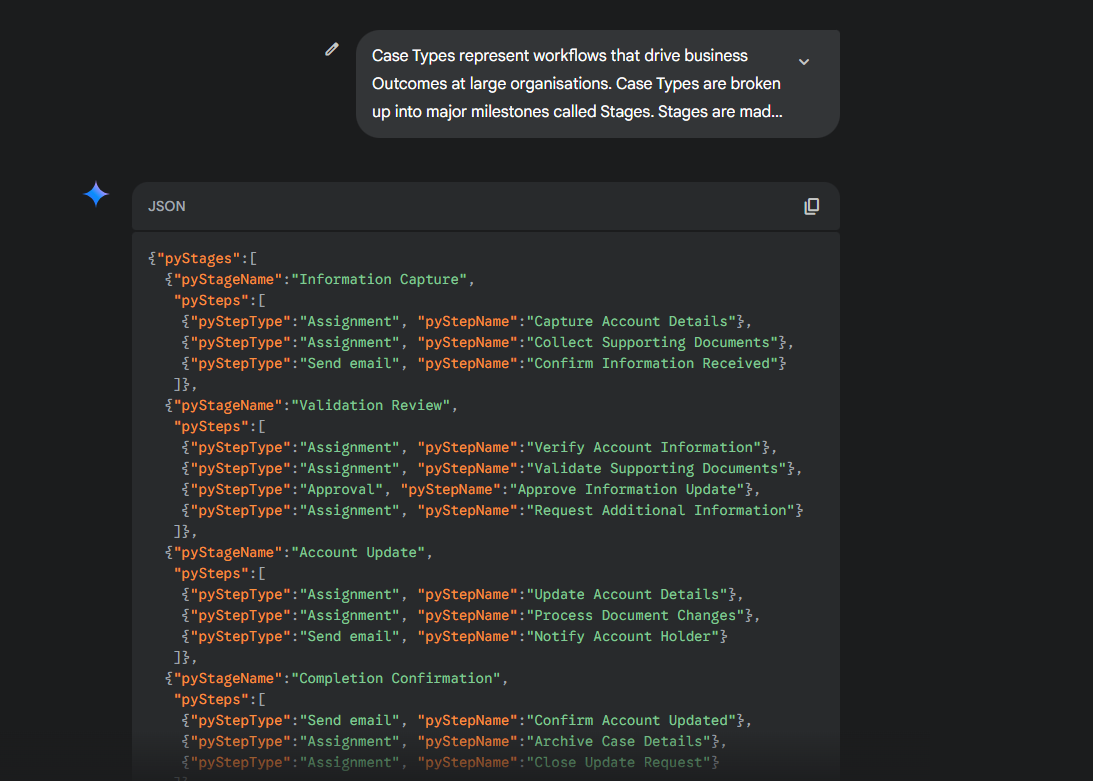
Based on the response, the system maps the structured response and displays the case-type stages and respective steps in draft mode.
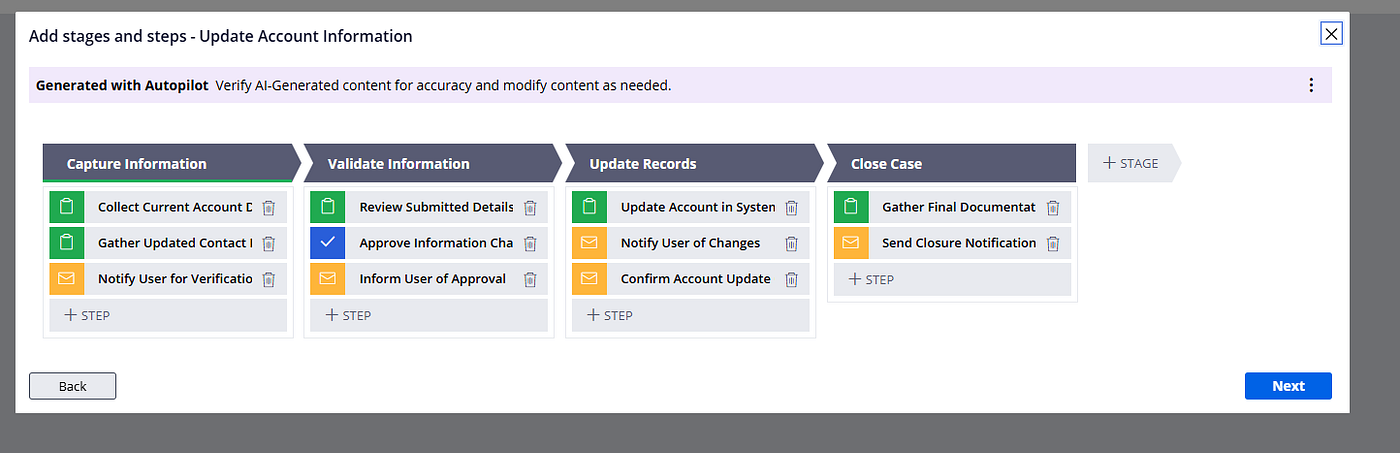
This helps the business to kick start the journey and customize as per the organisation's needs.
Hurrayyyyyyyyyyyyyy, congratulations :) you successfully understood how the Pega Gen AI features to communicate with the LLMs.