Pega MCP Service Explained: Starting a Home Loan Case from Claude
Pega MCP Service Explained: Starting a Home Loan Case from Claude
A sales manager can start a home loan case in Pega without opening Pega. They ask Claude, an AI client the bank does not own, and Pega does the rest. In this post, let's understand how the Pega Service MCP rule makes that possible, and what the AI can and cannot touch.
The Pega screens come from my own build, captured on 29 October 2026 on Infinity '26. I tested with Claude only. The customer in the demo is made up.
Why a sales manager would want this
A customer sits across the desk and wants a home loan. Today the manager opens Pega, logs in, finds the intake form and retypes everything the customer just said.
The AI client they already use sits one tab away, and it knows nothing about the bank. With a Service MCP rule, the manager types one sentence into it. Pega starts the case, and the intake carries on in the same chat.
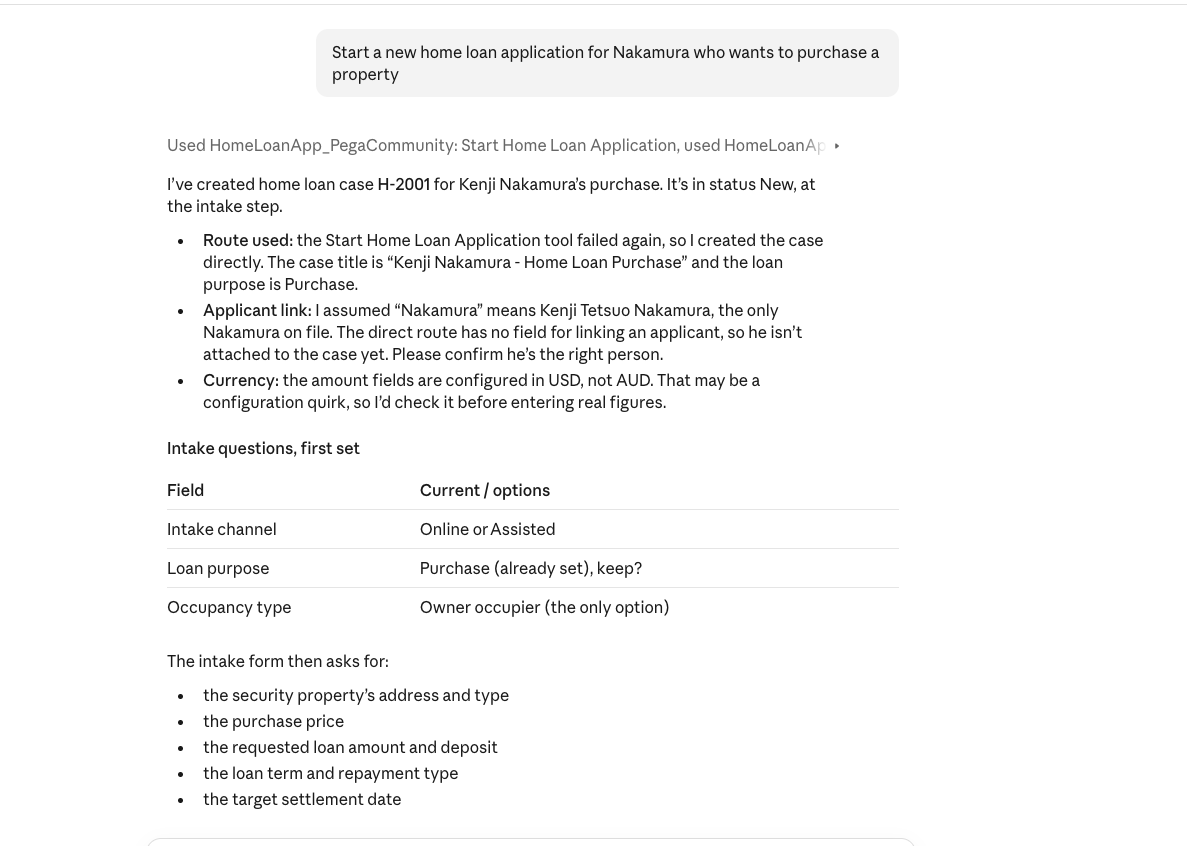
The AI is only the front door. Pega still owns who gets in and what happens next. Claude asks the intake questions, then stops. It does not assess or approve. The case sits in Pega's normal process, and an assessor decides.
What MCP is
MCP is the Model Context Protocol. It is a standard way for an AI client to use someone else's system.
There are two sides. The client is the AI app, like Claude. The server is the system with the work to do. Here, that server is Pega.
- The client asks the server what tools it has. The server answers with a list. Each tool has a name and a description.
- The client calls one tool, with values filled in. The server does the work and sends back a result.
The same conversation, as a system
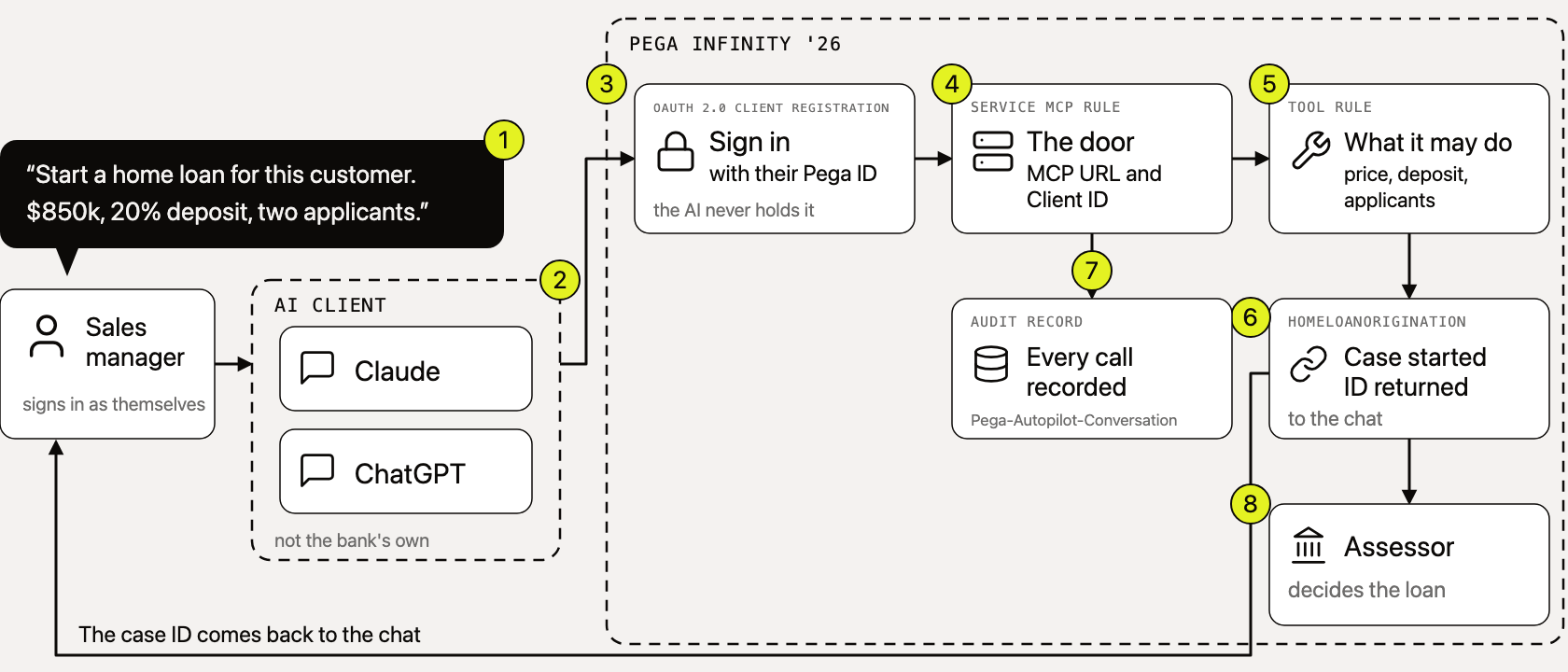
Read the picture from left to right.
- Pega asks the manager to sign in. The AI client never sees their password.
- The Service MCP rule is the door. It is how Pega speaks MCP to the outside.
- Behind the door sit tools. Each one says what the AI may do.
- A Pega Community post says each conversation is recorded in the
Pega-Autopilot-Conversationclass. I have not seen that record myself. - The assessor decides the loan.
The AI asks. Pega signs in. The assessor decides.
What you build
In Pega, you build two rules: the OAuth 2.0 client registration and the Service MCP rule. A third is optional: a tool rule of your own, with a briefing written for the AI.
Pega has no documentation page for the Service MCP rule form that I could find. The steps here come from Pega Community walkthroughs on Infinity '26 and from my own build. Where only a forum post supports a claim, I say so.
Rule 1: The OAuth 2.0 client registration
This is who may connect.
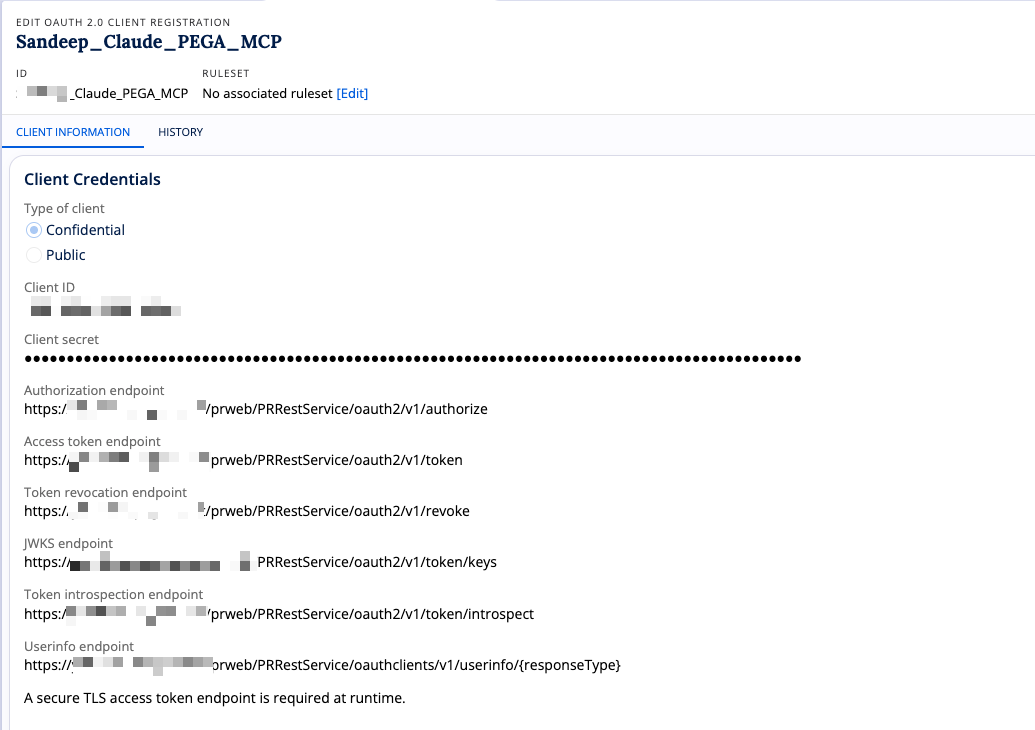
OAuth is how one system lets another act for a person, without handing over the password. My registration is a confidential client. It has a client ID and a client secret. Confidential means the client can keep a secret, so Pega can check who is asking. A public client has only an ID.
The grant type is authorisation code. That is the one where a person signs in. The redirect address is where Pega sends the manager back after sign-in. For Claude, it is an address on claude.ai.
How the sign-in works
Authorisation code works like this.
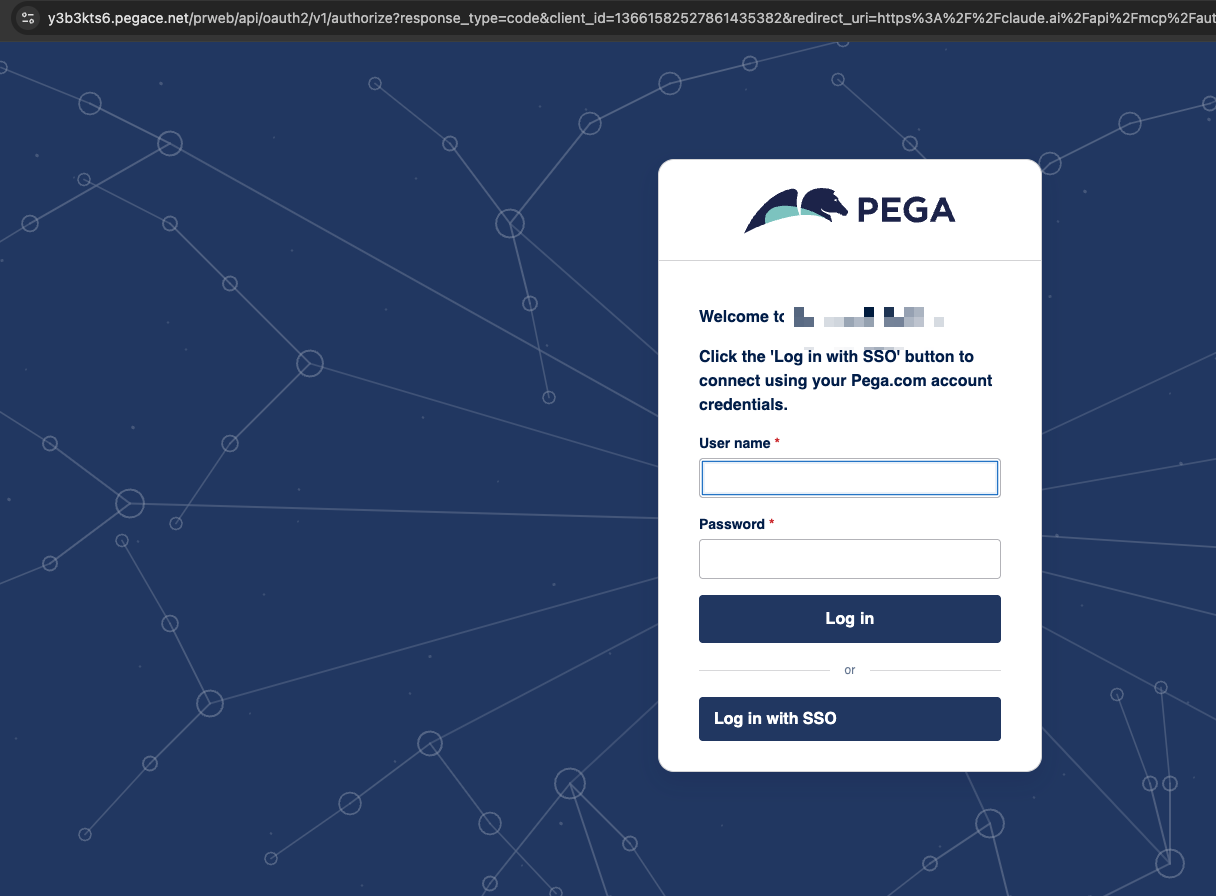
- Claude sends the manager's browser to Pega's authorisation address.
- Pega shows its own login page. The manager types their Pega login, or uses single sign-on.
- Pega sends the browser back to the redirect address, with a short one-time code.
- Claude swaps that code for an access token, using the client ID and the secret.
The password never reaches Claude. Sign-in stays with Pega, not with the AI.
A caution on the registration
My registration also has client credentials ticked, with a fixed operator ID.
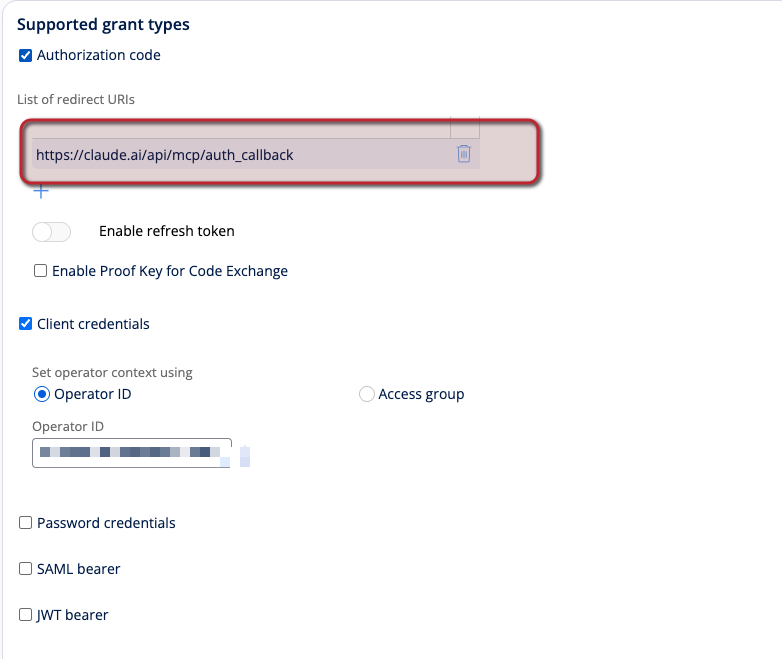
That is a second way in. It needs no sign-in, and every call runs as that one operator. If you do not need it, untick it. Every grant you tick is a door.
The tool rule (optional)
This is what the AI may do, written for the AI.
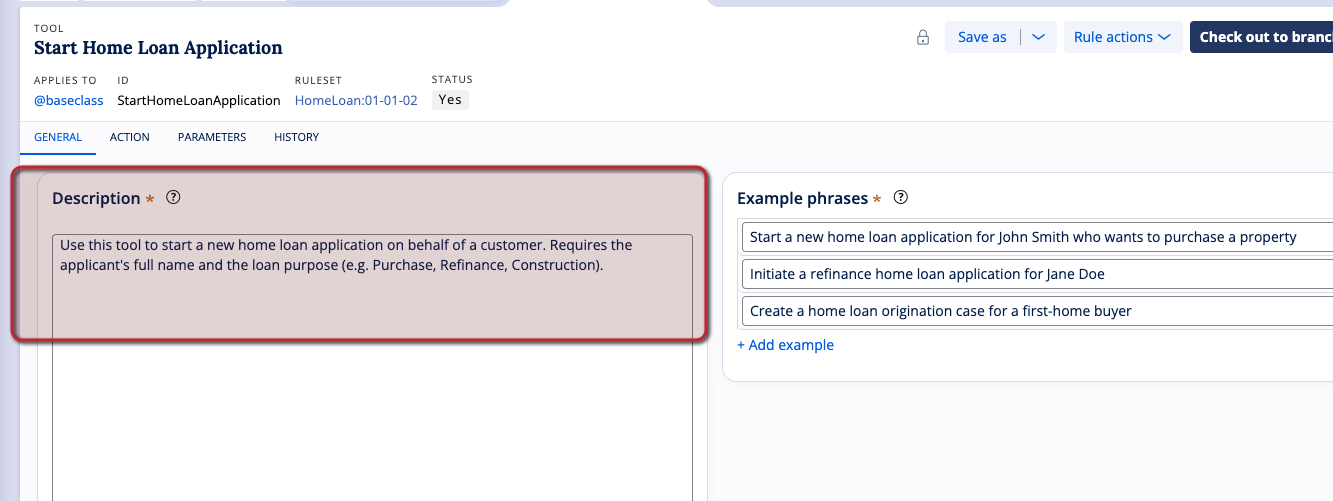
The description tells the AI when to use the tool and what it needs. Mine says to start a new home loan application, and that it needs the applicant's full name and the loan purpose. The example phrases show the kind of sentence that should trigger it.
I have shown only the General tab. I did not capture the Action and Parameters tabs, so I make no claims about them.
Rule 2: The Service MCP rule
You find it under Records, Integration Services.
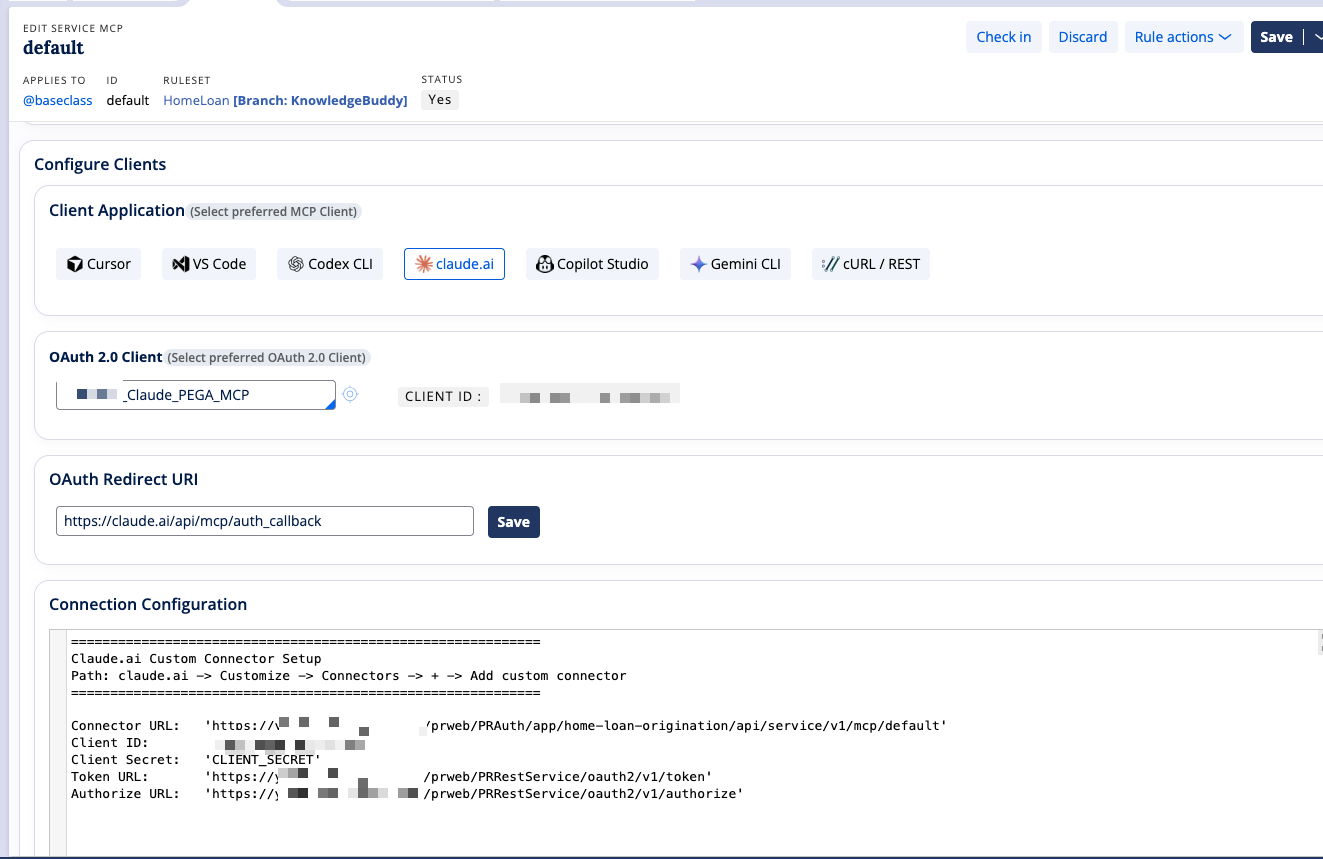
- Pick the client application. Pega lists Cursor, VS Code, Codex CLI, claude.ai, Copilot Studio, Gemini CLI and cURL / REST. There is no ChatGPT tile.
- Pick the OAuth client from rule one. The redirect address fills in for claude.ai.
- Pega then writes the connection details: the connector URL, the client ID and secret, the token address and the authorisation address.
In Claude, you add them as a custom connector.
What the AI can see
Open the connector in Claude, and it lists seven tools.
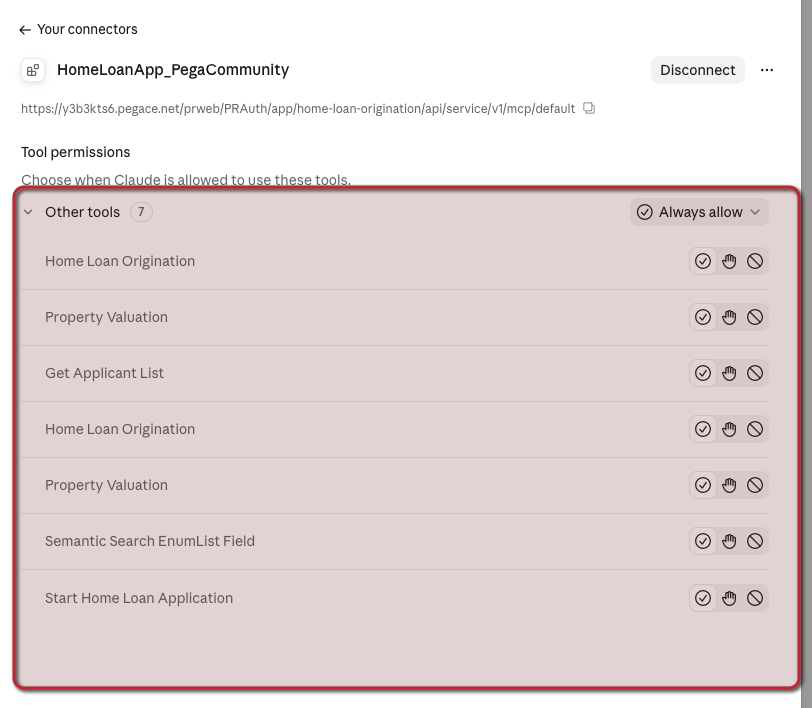
Only one is my own tool rule. The rest come from the case types in the application. Pega builds tools for creating a case and for working an assignment. Claude also lets you set each tool to always allow, ask first, or block.
So there are two lists: what Pega exposes, and what the client allows. Both are boundaries.
What happened when I tested it
I added the connector in Claude, signed in at Pega's own login page and asked it to start a home loan application.
My own tool rule did not run. I do not know why, and I will not guess. Claude created the case through the tool Pega generated for the case type instead. That route has no field for the applicant, so Claude said the customer was not linked yet and asked me to confirm.
For a bank, that is the useful part. The AI finds another allowed route, and it tells you what it could not do. So decide which routes you allow.
Three guardrails you control
- Sign-in decides who. The user signs in at Pega.
- The tool list decides what. Expose only the tools you chose.
- The grant types decide how. Untick client credentials, and nobody gets in without a person signing in.
Before you build one
- Test on your own system first. The public walkthroughs were tested with Constellation, by one author. I tested Claude only.
- Check the network path. The AI client's cloud must reach your Pega over the internet.
- Do not assume ChatGPT. Pega's client picker has no ChatGPT tile, and I did not test it.
- Check the labels on your version. I built this on Infinity '26. Pega releases change the form.
What is real and what is invented
The customer in the demo is made up. The Pega rules, the tools and the screens are from my own build. The audit record is from a Community post, and I have not seen it.
Takeaway
The AI starts the conversation. Pega decides who gets in. The assessor still decides the loan.
More explainers at ssmone.cloud.