How to protect a Pega REST API through network security, authentication and authorisation?
How to protect a Pega REST API through network security, authentication and authorisation?
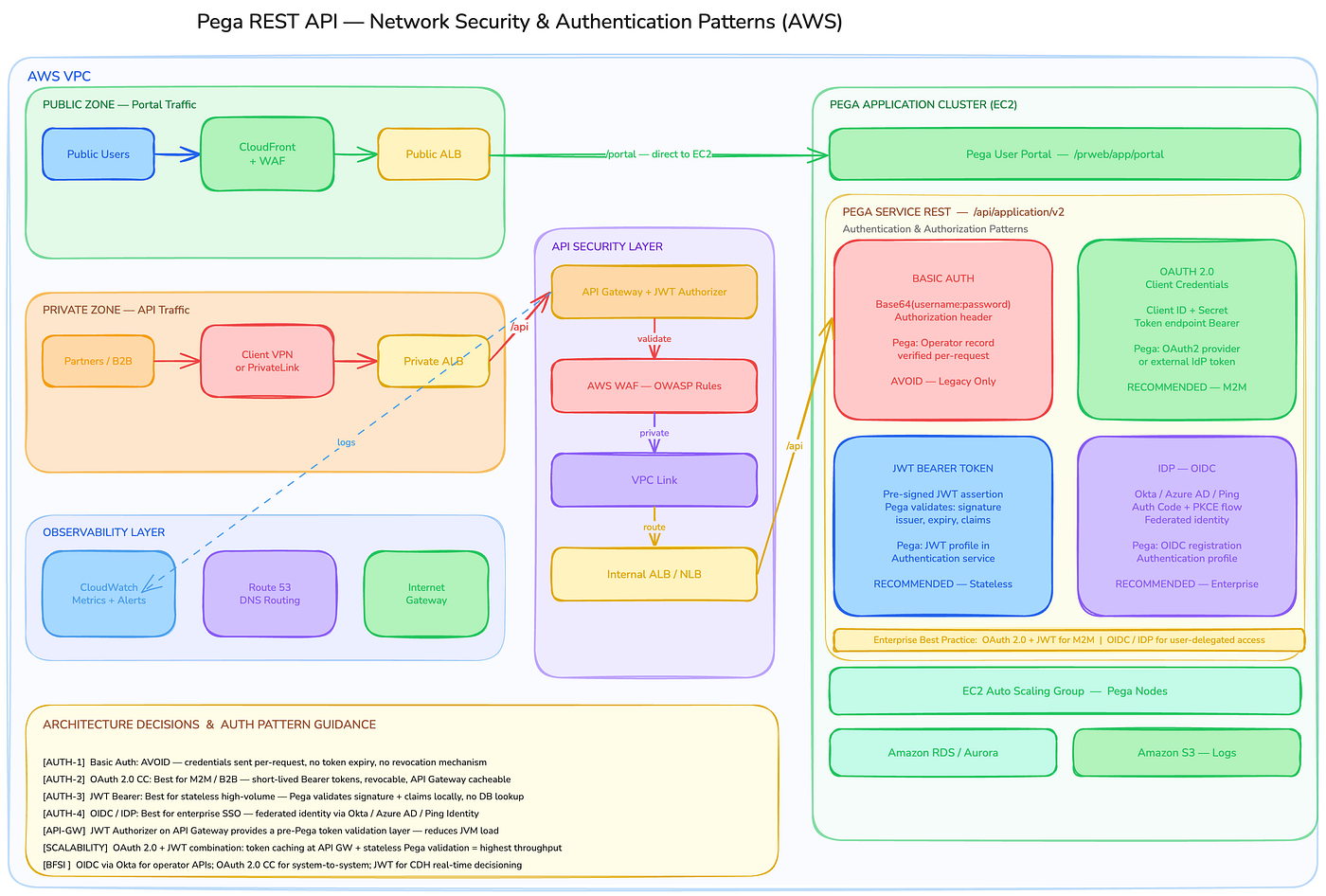
In our day-to-day Pega development work, one of the most common requirements we receive is, “We need to expose a new REST API to an external system.”
It could be a Pega Service REST rule you have built, or the out-of-the-box Pega DX API. Either way, the moment you expose an API to the outside world, one question must be answered: how do you protect it?
There are two layers of protection to understand:
- Network Security — controls how traffic reaches Pega
- Authentication & Authorisation — controls who can invoke the API and what they are allowed to do
Let us walk through each layer, step by step.
Part 1 — Network Security
Think of your Pega application as a building. Network security is everything that happens before someone even steps through the front door.
Two types of traffic — understand the difference first
Before we talk about components, we need to recognise that there are two very different callers:
- A human user opening a browser and logging into the Pega portal
- An external system making a machine-to-machine REST API call
These two types of traffic must be handled differently from the very start.
Step 1 — CloudFront + Web Application Firewall (Portal Traffic Only)
- Sits in front of the Public Application Load Balancer
- Amazon CloudFront protects against DDoS (Distributed Denial-of-Service) attacks
- AWS WAF enforces OWASP (Open Worldwide Application Security project)rules — blocks SQL injection, cross-site scripting, and common web exploits
- This layer applies to browser/portal traffic only — not API traffic
Step 2 — Application Load Balancers (ALB)
So what exactly is an Application Load Balancer?
- An ALB is a reverse proxy server that routes incoming traffic based on the URL path
- Example —
/prweb/app/portalis browser traffic,/api/application/v2is a REST API call - The ALB reads the path and sends each request to the right destination
The key design principle here is — use two separate ALBs, not one shared ALB:
Public ALB- Portal traffic — /portalPega EC2 nodes directly
Private ALB- API traffic — /apiAPI Gateway → security chain
Why separate? Independent security rules, independent certificates, and independent scaling policies for each traffic type.
Step 3 — Control Who Can Reach the API Endpoint
Before we even talk about authentication, we need to ask — who should be able to reach this API endpoint in the first place?
A few common patterns are depending on your use case:
- VPN / AWS PrivateLink — the endpoint is completely private; only systems with explicit network-level access can reach it. Best for high-security BFSI integrations with known partners or internal systems
- IP Whitelisting on WAF / ALB — the endpoint is accessible on the internet, but only from known, trusted IP ranges. A practical middle ground for partner integrations with fixed source IPs
- Public endpoint, authentication only — the endpoint is open on the internet, secured purely by OAuth 2.0 or JWT. Appropriate for public-facing APIs like mobile app backends
Private endpoint with VPN or PrivateLink is the expected baseline for system-to-system integrations.
Part 2 — Authentication & Authorisation Patterns
The network has done its job. The request has arrived at the Pega application boundary. Now the question is — who are you, and are you allowed to do this?
Pega supports four authentication patterns for securing a Service REST API. Let us go through each one.
Option 1 — Basic Authentication
How it works:
- The client sends the Pega operator username and password, encoded in Base64, inside the
Authorizationheader - Pega decodes it and validates against the operator record in the Pega database
- Credentials are sent with every single request
Pros:
- Simple to implement — any HTTP client supports it out of the box
- No additional configuration needed in Pega
Cons:
- Credentials are exposed with every request — high risk if intercepted
- No token expiry — access never times out automatically
- No revocation mechanism — if compromised, access continues until the password is manually changed
- Not recommended
Think of Basic Auth as handing someone a key that never expires and cannot be recalled.
Option 2 — OAuth 2.0 Client Credentials
How it works:
- The calling application uses a Client ID and Client Secret to request a Bearer token from a token endpoint
- The Bearer token is short-lived — it has an expiry timestamp
- The client includes the Bearer token in the
Authorizationheader when calling the Pega REST API - Pega validates the token and processes the request
Where does the token come from?
- Pega can act as the OAuth 2.0 Identity Provider natively
- Or Pega can delegate to an external IdP — Okta, Azure AD, Ping Identity
- In enterprise BFSI, an external IdP is the standard approach
Pros:
- Token expires — access automatically times out
- Token can be revoked — compromised access can be cut off immediately
- Actual credentials are never sent with the API request — only the token travels
- Recommended for machine-to-machine (M2M) integrations
Cons:
- Identifies the machine / application, not the individual user
- Cannot enforce user-level, fine-grained access restrictions on its own
- Not suitable where user identity needs to be audited per request
Think of OAuth 2.0 as a corporate access badge — it confirms the device is legitimate, but it does not tell you which employee is carrying it.
Option 3 — JWT Bearer Token
How it works:
- An external Identity Provider — Okta, Azure AD, or any standards-compliant IdP — authenticates the user or system and issues a signed JWT (JSON Web Token)
- The JWT contains: user identity, roles and claims, expiry timestamp, issuer details — all cryptographically signed
- The client passes this JWT as a Bearer token in the
Authorizationheader
How Pega validates it:
- Pega maintains a Token Profile rule instance
- The Token Profile defines: trusted issuers, the JWKS endpoint (where Pega fetches the public key to verify the signature), and how claims map to Pega’s access model
- The Service Package invokes an authentication activity to validate: signature, issuer (
iss), expiry (exp), and configured claims - Validation is entirely local — no external call to the IdP per request
Pros:
- Stateless validation — no database lookup per request, no external network call
- Supports fine-grained access control — Pega can read claims (role, department, permission level) and enforce granular restrictions
- Highly scalable — ideal for high-throughput APIs and real-time decisioning scenarios
- Better suited for stateless API architecture
Cons:
- User records are maintained in the external system, not in Pega — Pega is no longer the identity source of truth
- Token revocation requires careful design — a signed token is valid until it expires, unless a revocation list is implemented
If OAuth 2.0 is a visitor badge, a JWT is a smart card — it carries your identity, clearance level, and expiry, all encoded and signed inside it.
Option 4 — OpenID Connect (OIDC) via Enterprise IDP
How it works:
- Most BFSI organisations maintain a centralised identity in Azure Active Directory, Okta, or Ping Identity
- These systems enforce password rotation policies, multi-factor authentication, account lockout, and security governance — all outside of Pega
- The calling application or user authenticates against the IDP using Authorization Code + PKCE (Proof Key for Code Exchange) flow
- The IDP issues an ID Token and an Access Token upon successful authentication
- The client presents the Bearer token when invoking the Pega REST API
How Pega validates it:
- Pega uses an Authentication Profile rule configured as OIDC type
- The profile points to the IDP’s discovery endpoint — from which Pega retrieves the JWKS (public signing keys)
- Pega validates: token signature (against JWKS),
iss(issuer),aud(audience),exp(expiry) - Pega maps the IDP identity claims to a Pega operator record
- Validation is local — Pega does not redirect the user or call the IDP per request
Pros:
- User identity is centrally managed — maintained, governed, and enforced by the organisation’s security team
- Meets enterprise compliance requirements — MFA, password rotation, account lifecycle all handled by the IDP
- Single source of truth for all application access — not just Pega
- Best for user-delegated access scenarios — portals, mobile apps, operator-initiated integrations
Cons:
- Configuration dependency on the IDP — if the IDP is unavailable, new token validation fails
- Requires careful resilience design — token caching, connection timeouts, and fallback handling need to be planned
- Slightly more complex initial setup compared to OAuth 2.0
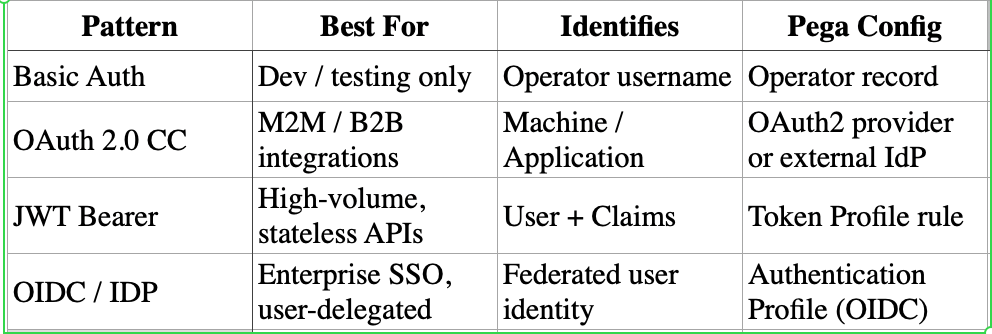
The decision framework:
- System calling system, no user involved → OAuth 2.0 Client Credentials
- High-volume, stateless API with user-level access control → JWT Bearer Token
- User-facing integration backed by corporate identity → OpenID Connect
- Never in production → Basic Authentication
And always remember — authentication is the last line of defence, not the first. The network security layers — CloudFront, WAF, ALBs, VPN, API Gateway — should be doing the heavy lifting before a single line of Pega authentication logic ever runs.
Wohoooooo, Congratulations :) Now you have successfully understood how to protect a Pega REST API through Network security, authentication and authorisation patterns.