Deploy a simple scikit linear regression predictive model to Google AI Platform
Deploy a simple scikit-learn linear regression predictive model to Google AI Platform
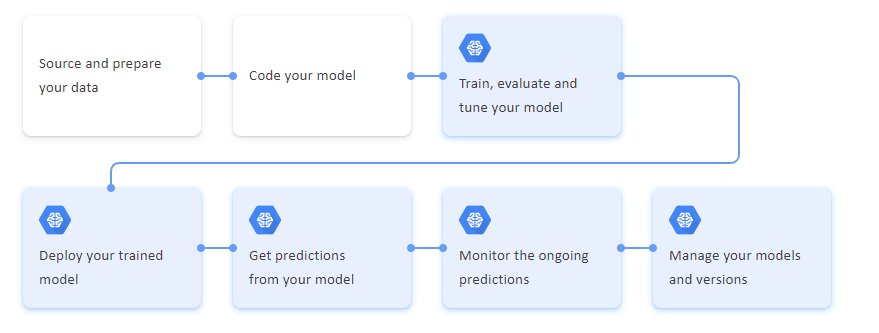 ML — Workflow
In this particular post, we will learn how to deploy a simple House Price scikit linear regression predictive model to the Google AI Platform.
Following technologies and systems are involved:
- Dataset [Reference from the Kaggle website]
- Google Colab [Jupyter notebook environment to develop the model]
- Google Cloud Shell [To interact with Google Cloud platform components]
- Google Cloud AI Platform [To deploy the developed predictive model]
One of the useful capabilities of Google AI Platform is to run the predictive machine learning models in a cost-effective way. The client specific applications are decoupled with the ML workflows. It is an effective way of serving the models. The AI Platform takes care of the auto-scaling.
Develop a Predictive Model from the data set
Effective Model development is out of the scope of this post. We will refer to the four step process — Data Preparation, Data Analysis, Model Development and Model Deployment
Step 1: Get the data set
From the dataset, identify the features that drive the house price. In this example, use the following house price dataset from the Kaggle website.
House price prediction
_Predicting the house price_www.kaggle.com
Step 2: Use Google Colab to develop the model
For the model development, use Google colaboratory which is a Jupyter notebook environment. Refer to the below on the set-up and access:
Google Colaboratory
_Edit description_colab.research.google.com
Step 3: Key takeaways of the model development
a. Identify key features that affect house prices
b. Model building
Data Preparation
Identify the key features that affect house prices and address the problems present in the dataset.
Note: Import the dataset into the Google drive and mount to the Notebook.
Import the relevant Python packages and load the data set
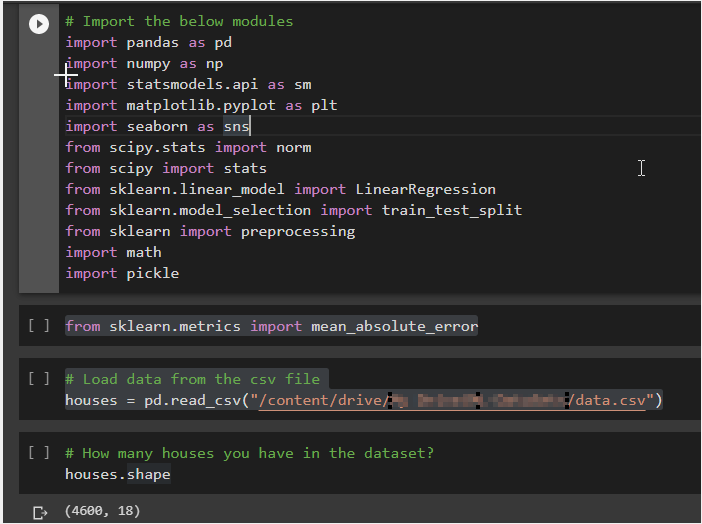
Data Analysis
Identify the data types [numeric and categorical] present in the data set
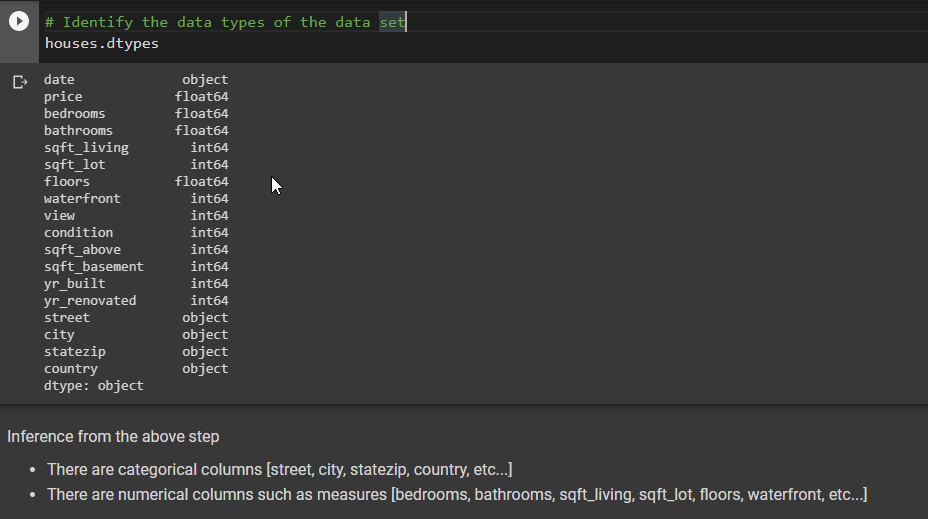 -
-
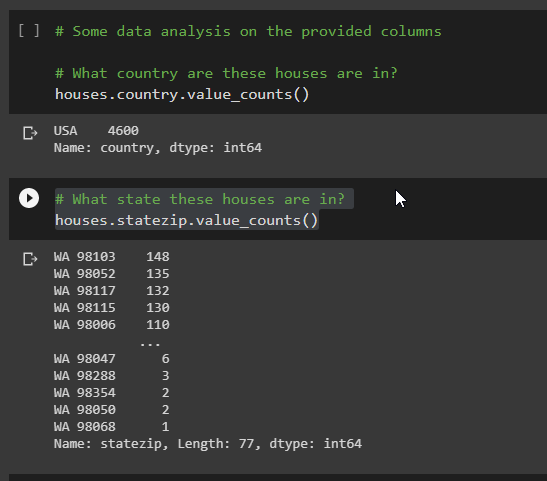
- What country the houses are in?
- What states these houses are in?
- The average price of the house?

Find the relationship between the number of bedrooms and the price of the house. Generally, the more number of bedrooms the higher the price is.
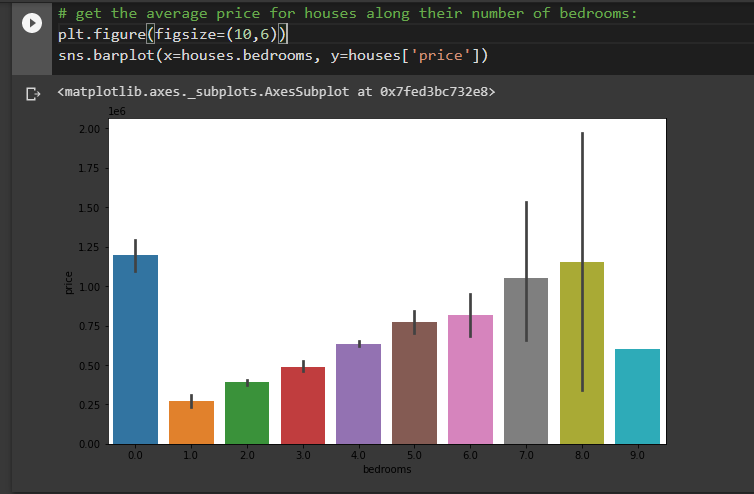
Get a price breakdown for each bedroom group
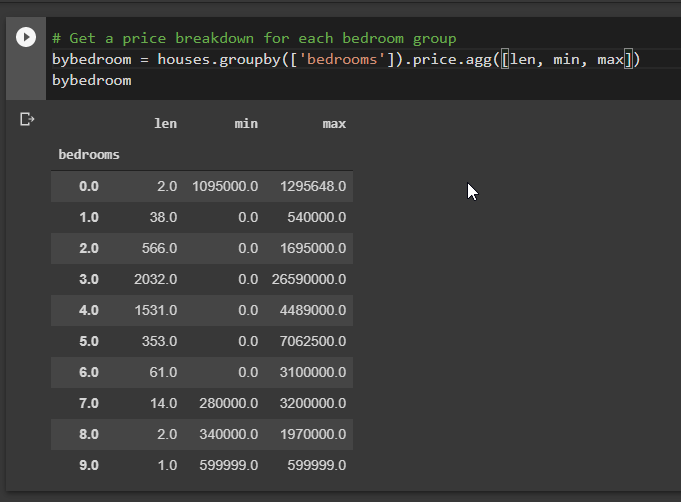
Inference from the above step:
- There are 2 houses with 0 bedrooms
- There is a max outlier in several bedrooms with 3
- There is only one house with 9 bedrooms and might be faraway from the city. If we want to consider several bedrooms as a predictor in our model, then we have to do something
- Some houses have a price of zero
Let’s deal with the problem: Houses with null prices
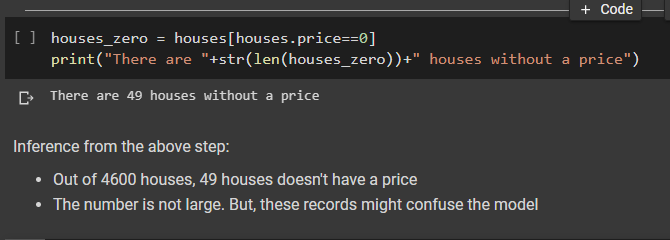
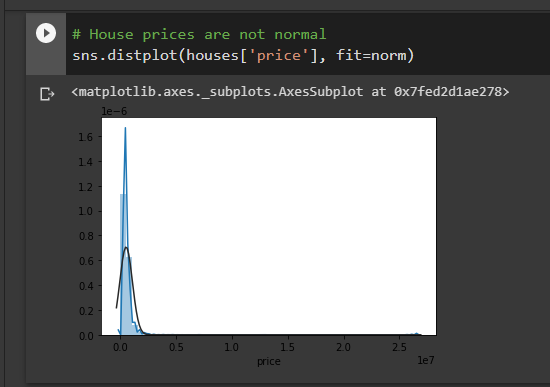
Inference from the above step:
- Blueline is the price distribution
- Blackline is the normal distribution
We have 3 problems:
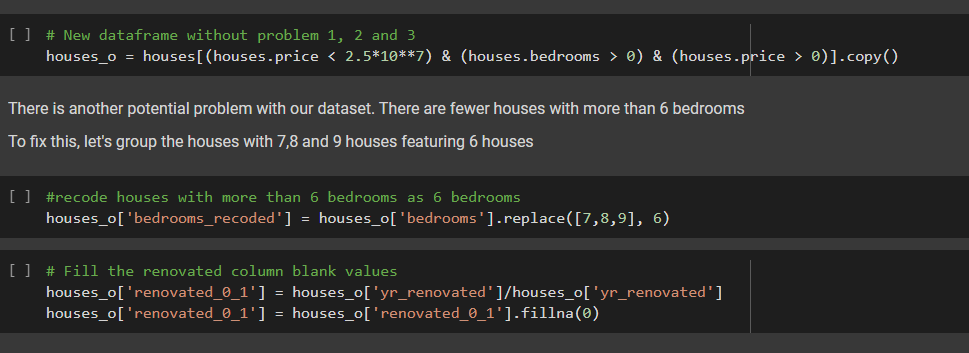
- Houses with 0 bedrooms
- Giant outlier at almost $27M — 50 times the price of a normal house
- 49 Houses without a price
Develop a new data frame without problem 1,2 and 3
Model Development
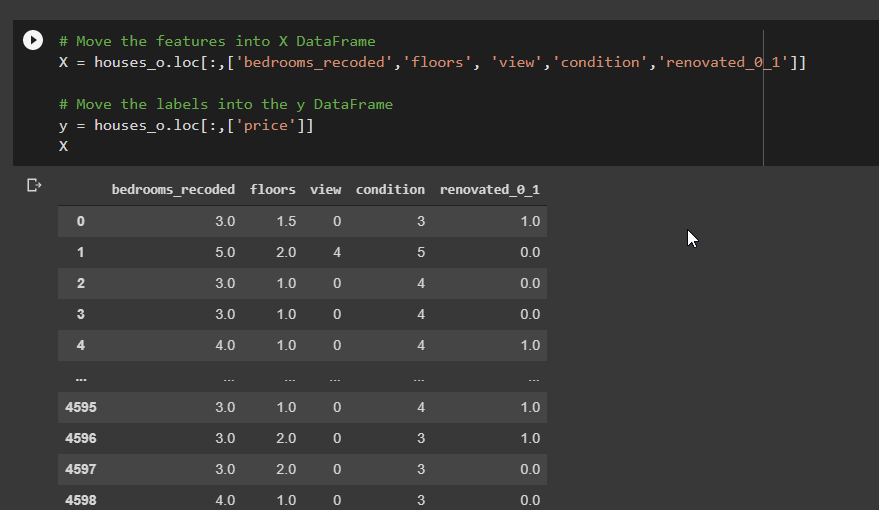
Move the relevant features into the X data frame and predict labels into the y data frame
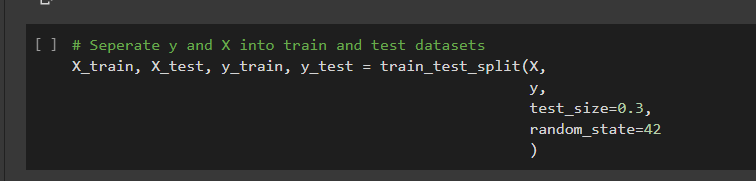
Seperate y and X into train and test datasets
Train the basic multiple regression model and print out the coefficients
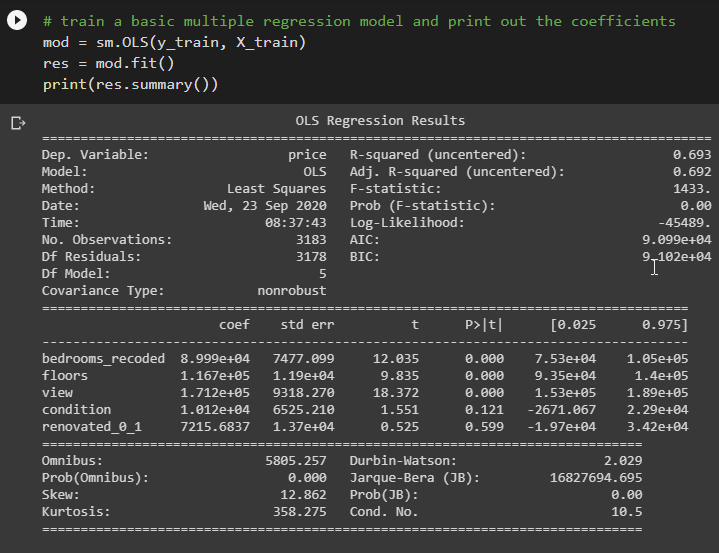
Inference from the above step:
Based on the coefficients:
- There is a gain of $170k [1.712 x (10⁵)] for a single value change in view
- Obviously, it is not a great model
Model Deployment
Export model as a pkl file
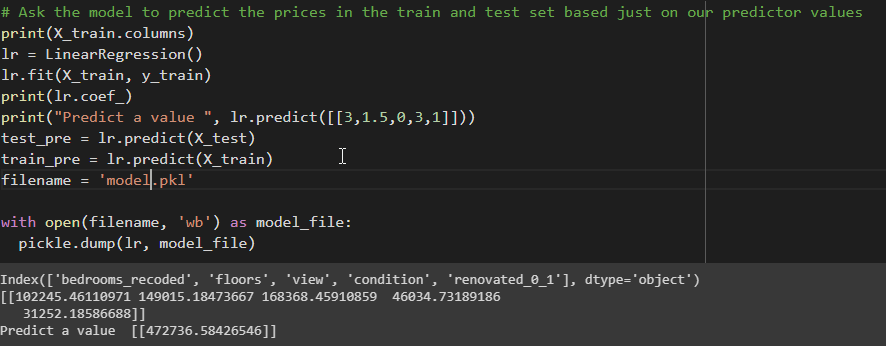
Deploy Model to Google AI Platform
Step 1: Install the Google Cloud SDK
Refer to the below on installing the Google Cloud SDK
Cloud SDK Command Line Tools | Cloud SDK: Command Line Interface
_Send feedback Key features Key features gcloud command-line tool The gcloud CLI manages authentication, local…_cloud.google.com
Step 2: Create and upload the model to Cloud Storage bucket
Create a sepearate region specific storage bucket to store the model files. For understanding purposes, give ai-models as an extension point of the bucket.
gsutil mb -c standard -l us-east1 gs://BUCKET_NAME-ai-models
Ensure the model file is in either pickle format [model.pkl] or joblib format [model.joblib].
Navigate to the model downloaded folder and run the copy command
gsutil cp ./model.pkl gs://YOUR_BUCKET/model.pkl
Note: Ensure the IAM service account has access to the storage bucket
gsutil -m acl ch -u SERVICE_USER@cloud-ml.google.com.iam.gserviceaccount.com:R -r gs://YOUR_BUCKET
Step 3: Create the Model in the Google AI Platform
The following command creates a model.
gcloud ai-platform models create HousePriceLinearRegression --region=us-east1
Verify the same in the Google Cloud Console
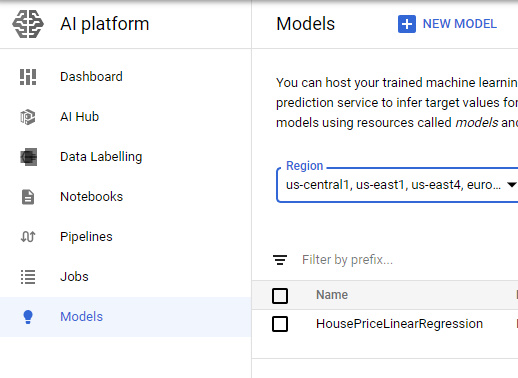 Model in AI Platform
Step 4: Create the executable state of a Model version
Run the following command to create the model
Note: Attributes are as per the created the model. Framework — scikit-learn, python version — 3.7
gcloud ai-platform versions create HousePricePredV1 --model=HousePriceLinearRegression --origin=gs://YOUR_BUCKET/HousePricePrediction --runtime-version=2.2 --framework=scikit-learn --python-version=3.7 --region=us-east1 --machine-type=n1-standard-2
Verify the deployed version in the Google Cloud Console
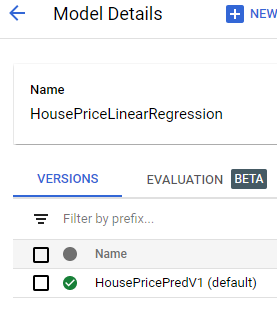 Deployed Model Version
Test the deployed predictive model
- Click on the deployed model version and navigate to Test & Use tab
- Provide the input json data to the model
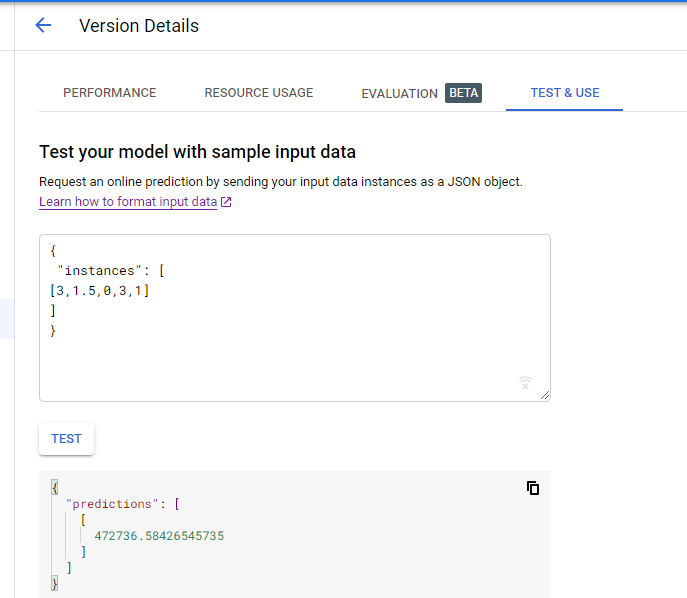 Testing the deployed model
Congratulations, on successful deployment of a simple scikit-learn predictive model to Google AI Platform :)