AI Agent use case #2 — Personal Weather Buddy Telegram Bot Agent
AI Agent use case #2 — Personal Weather Buddy Telegram Bot Agent
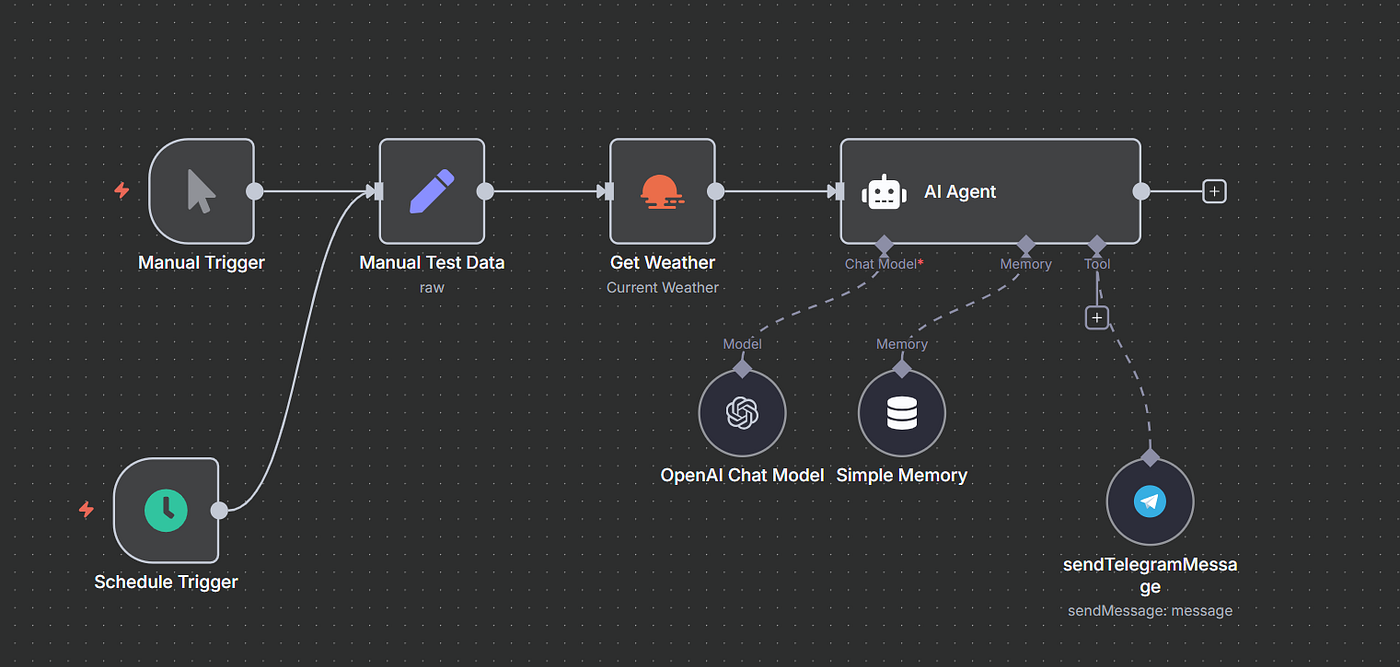
In this post, let’s develop a basic AI agent using n8n. Use case #2: Checking the weather has become a daily ritual. Most of us open a weather app each morning to decide whether to carry an umbrella or wear cotton clothes. This is simple, but repetitive. Instead of doing this manually, we can build an AI agent that checks the weather and sends a friendly reminder on Telegram.
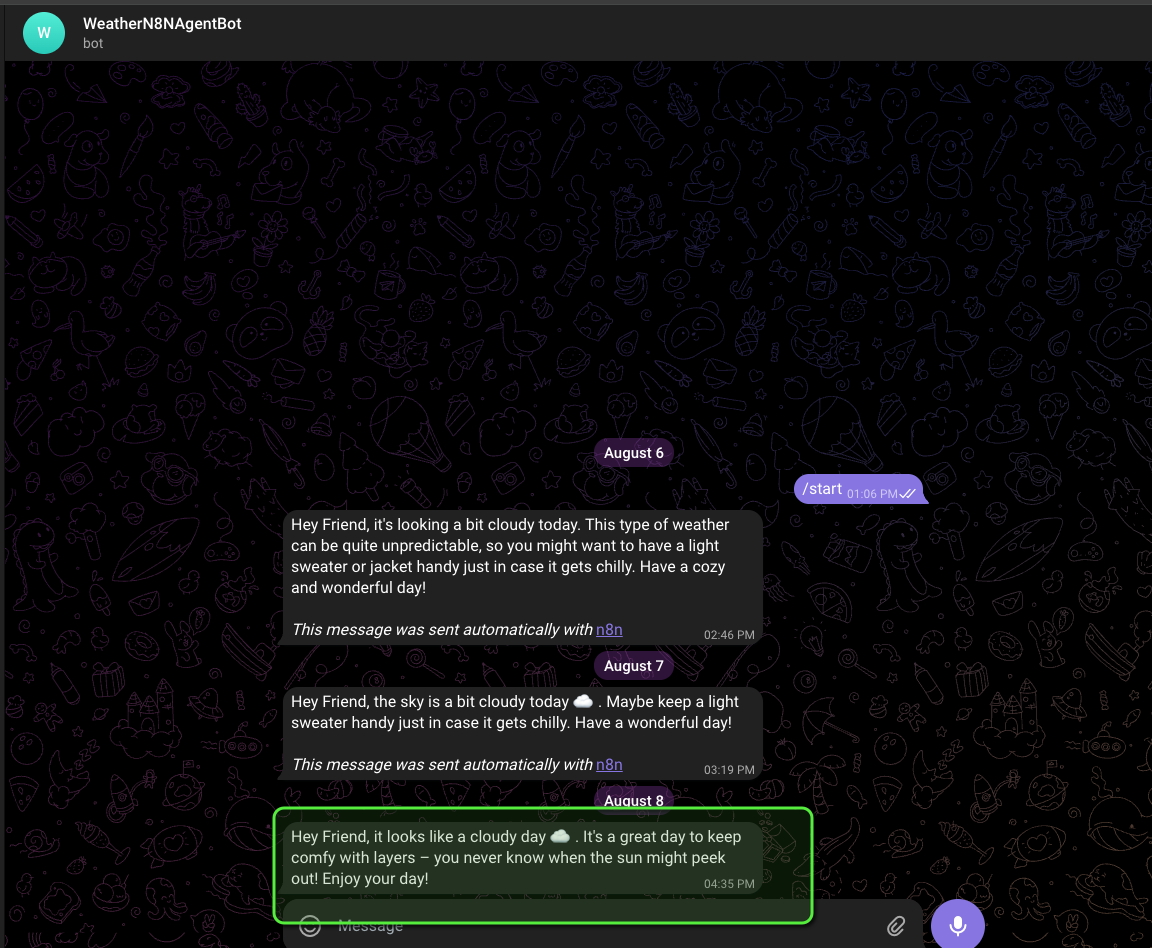
Example outputs:
- Rainy → “Hey Friend, don’t forget your umbrella and jacket.”
- Sunny → “Hey Friend, wear cotton clothes to stay cool.”
This eliminates the friction of checking apps and transforms raw data into empathetic, human-like advice.
Tools Used
- n8n — For workflow development. You can run it locally or in the cloud.
Recommendation: It’s open-source, lightweight, and perfect for agent-based workflows. - OpenAI LLM — Acts as the Brain of the agent. It takes raw weather data and converts it into short, empathetic reminders.
- OpenWeatherMap API — Provides the daily weather forecast for a configured location.
- Telegram Bot — Delivers the final reminder message straight to your chat.
Workflow Steps
- Trigger → Manual or Scheduled (e.g., every day at 8 AM).
- Get Weather → Fetch today’s weather from OpenWeatherMap.
- AI Agent → Process weather conditions using the system prompt.
- Telegram Message Tool → Send a personalised message to Telegram
AI Agent definition
Every organisation is trying to embrace AI. A simple definition of an AI agent is a digital employee — a smart, autonomous software program that can perform tasks and achieve goals on your behalf.
AI Builder needs to configure three basic things for the Agent:
- Brain: An LLM system prompt.
- Memory: Tools to store the previous data context.
- Tools: Access to external services to take action.
Prerequisites
- Telegram Bot (create via @BotFather, get
TELEGRAM_BOT_TOKEN&TELEGRAM_CHAT_ID) - OpenAI API Key
- OpenWeatherMap API Key
Note: n8n is a low-code tool for AI agentic workflows. Setting up the n8n workflow as shown in the image should be straightforward.
Step 1: Set up an n8n account
You can set up a local instance/cloud instance. Recommendation: It is an open-source platform. Install it locally.
n8n Hosting Documentation and Guides | n8n Docs
_Access n8n hosting documentation and guides. Find comprehensive resources to help you set up and manage your…_docs.n8n.io
Step 2: Configure the n8n workflow
Option #1 — Practice configuring the n8n nodes as per the image. Recommended to get the hands-on expertise.
Option #2 — Import the n8n workflow JSON from the GitHub repo below
👉https://github.com/sunnyclinches44/n8n-Weather-Buddy-Telegram-Bot
Step 3: Configure the required credentials
Option #1 — Set up credentials manually with hardcoded values
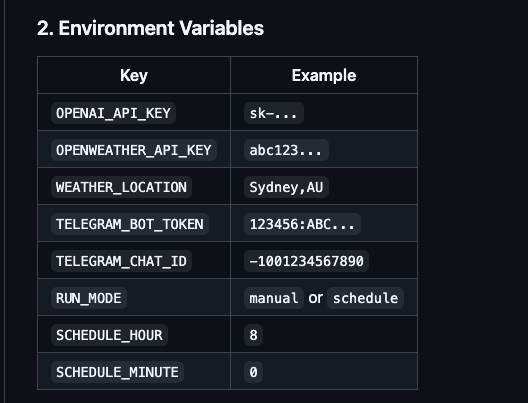
Option #2 — Set up credentials using the below env variables [Recommended]
Step 4: Understanding the LLM Prompt
Brain of the AI agent — Comes from the below prompt. Receives the weather input and takes actions using the tools configured. In this case, it is responding in a Telegram Bot.
You are a friendly personal weather assistant named Weather Buddy.
Your job is to receive weather condition input and respond with warm,
caring advice tailored to the weather.
Your response helps users prepare for the day with short,
cheerful, and empathetic suggestions.
You have access to this tool:
sendTelegramMessage(text: string)
– Sends a short message to the user on Telegram.
Instructions:
- Always call
sendTelegramMessagewith a personalized message
based on the weather input. - Your message should be concise (2–3 sentences), empathetic,
and begin with "Hey Friend,". - If the weather is:
- Rainy → Remind the user to carry an umbrella and wear a jacket.
- Sunny → Recommend wearing cotton clothes to stay cool.
- Extrapolate this tone and structure to future weather conditions.
- Only ask for clarification if the weather input is missing or unclear.
- Do not return raw text responses. Always wrap your message in the tool format below:
Example:
{
"tool_call": "sendTelegramMessage",
"arguments": {
"text": "Hey Friend, it’s sunny today ☀️. Don’t forget your cotton clothes and sunglasses!"
}
}
Weather condition input: """ {{ $json.weather[0].main}}"""
#### **Step 5: Test the n8n Agent**
- Open the Telegram Weather Bot Agent to see the response
My experience, we need to practice in configuring the nodes. It takes multiple iterations to have everything work. Then we understand how easy to configure an AI agent.
Wohooooooo, Congratulations on configuring a simple personal weather buddy agent :) :)